

C-function#
Block appearance in REPEAT VISION#
The C-function block allows you to execute programs written in the C language (standard C99 and higher). The code itself can be edited in the built-in Application editor, which can be accessed using one of the following methods:
By double-clicking LMB on the block
Select a block by clicking on it with LMB;
Click on the Edit block code button located in the right panel of the project settings in the
Actionssection.
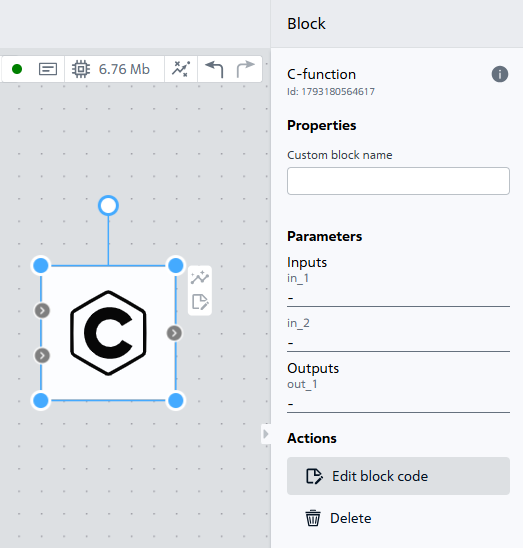
Fig. 1 Edit block code#
The C-function block contains three subsections of code (see Fig. 2, Fig. 3, Fig. 4 below):
Code executed once before the start of the calculation (setting initial values of variables, preparing data)
The main calculation code executed at each step of the model calculation
Code executed once after the completion of the calculation (freeing resources, final calculations).

Fig. 2 Initialization#

Fig. 3 Modeling code#

Fig. 4 Uninitialization#
Note
In addition to the code sections, the right panel of the block contains Global variables and Parameters, which are available in all three sections (see Global variables and Parameters).
1. Port settings#
To configure ports, you need to (see Fig. 5 below):
Add an input or output by clicking on the + button located in the right panel next to each
InputsandOutputsparameter;Delete an input or output by clicking on the - button, located in the right panel next to each
InputsandOutputsparameter and appearing when you hover the cursor over the desired parameter;It is possible to set your own custom port name and use this name as a variable in the
Modeling codesubsection.
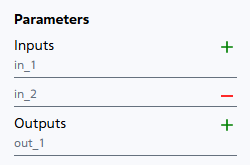
Rice. 5 Block parameters C-function#
Note
To specify a custom name, double-click LMB to the port name to activate the name editing field, then specify your own name. The port name is used in the calculation code as a double variable, meaning the name must comply with C language identifier requirements (Latin characters, numbers, and underscores; cannot begin with a number; must not be a keyword such as int, static, return, etc.; and must not match the names of standard library functions such as sin or exp).
To return to the diagram, you need to click on the Back to the schema button, located in the right panel.
2. Global variables and parameters#
Global variables — variables that are declared once and retain their value between calculation steps. Each variable is assigned a name and type (e.g., double, int, bool). The initial value of a global variable is specified in the Initialization section.
Parameters — variables whose value is set directly in the right panel of the block when configuring the scheme, without changing the code. Each parameter is assigned a name, type, and value. Parameter values are assigned automatically before the Initialization section is executed, so there’s no need to initialize them in the code.
Hint
Both global variables and parameters are available in all three code sections.
3. Filling in code sections#
The standard header files math.h, stdint.h and stdbool.h are automatically included for all sections, so mathematical functions (sin, cos, exp, sqrt, pow, fabs, etc.), fixed-width integer types (int32_t, uint8_t, etc.) and the bool type can be used without additional #include directives.
3.1. Initialization#
The section is executed once before the calculation starts. It sets the initial values of global variables and prepares the data. The variable dt, the model calculation step, is available within this section.
Example (global variables prev_in of type double and counter of type int are defined in the right panel, parameter tau of type double is set to 0.5):
prev_in = 0.0;
counter = 0;
3.2. Modeling code#
This section contains the code executed at each step of the model calculation. This section contains:
input port variables (read only);
output port variables (for writing the result);
variable
dtis the calculation step of the model;переменная
t— текущее модельное время, [с];
Also, within a section, you can declare local variables, which exist only within one calculation step.
The example implements a first-order filter with a time constant tau and a count of the number of steps performed:
double alpha = dt / (tau + dt);
double y = prev_in + alpha * (in_1 - prev_in);
prev_in = y;
counter = counter + 1;

out_1 = y;
out_2 = sqrt(fabs(in_1));
out_3 = (double) counter;
Port variables (example: in_1, out_1, out_2, out_3) are of type double and are declared automatically when the code is compiled, so they do not need to be declared or initialized separately. Input ports cannot be modified - attempting to assign a value to an input port will result in a compile error.
3.3. Uninitialization#
The section is executed once after the calculation is completed. It allows you to free resources allocated in the Initialization section or perform final calculations. The dt variable is available within the section.
counter = 0;
4. Description of the block operation#
Like most blocks in the application, the C-function block performs a calculation in the general model cycle with a given step, which is determined by the solver using a numerical method for solving a set of equations. The code from the three sections is combined into a single file in the C language, which is compiled once before the calculation begins. Next, the Initialization section is executed once before the calculation, the Modeling code section is executed at each step, and the Uninitialization section is executed once after the calculation is completed.
The code of the C-function block is executed in a separate, isolated process. This is done for safety reasons: an error in the C code (for example, accessing an invalid pointer or going beyond the bounds of an array) will not lead to an abnormal termination of the entire calculation - an error will be printed in the journal and the calculation will be stopped. Data exchange between the model and the block code occurs at every calculation step, so if there are a large number of C-function blocks in the circuit or a very small calculation step, this may affect performance.
Important
Section codes cannot be changed during calculation; you must restart the calculation to apply the changes.
5. Error output/a>#
A description of errors when running the circuit with the C-function block can be found in the journal. The following types of errors are possible:
Compilation error - a compiler message is output to the log indicating the line and describing the error (syntax error, undeclared variable, invalid type, etc.). The calculation fails to run. The line numbers in the message correspond to the lines in the resulting merged file, so focus primarily on the error text and the variable or function name.
Runtime error — abnormal code termination at one of the calculation steps (division by zero for integers, access to an invalid pointer, array out of bounds). The journal indicates at which stage (initialization, modeling or uninitialization) the error occurred.
Execution timeout - if the code of one section does not complete within the allotted time (for example, due to an infinite loop), the execution of the block is forcibly interrupted, and a corresponding message is displayed in the journal.
6. Coding guidelines#
When working with the C-function block, you can use the syntax and semantics of the C language, however, due to the peculiarity of calculating loops (see Error output) it is not recommended to use loops with multiple iterations, especially infinite loops, inside the code. All loops must have a mandatory exit condition, otherwise the execution of the block will be interrupted due to timeout, which can also greatly affect the performance of the calculation.
In addition, it should be taken into account:
It is not recommended to use standard input/output stream functions such as
printf(),scanf(), etc., as well as working with files and any system calls - their result is not processed by the Application and is not displayed in the diagram. The same applies to the functionsexit(),abort()and similar ones: calling them will lead to an abnormal termination of the block.Memory allocated with malloc()/calloc() in the
Initializationsection should be freed with free() in theUninitializationsection. Allocating memory at each step in theModeling codesection is not recommended.The values of local variables declared in the
Modeling codesection are not saved between steps. To store state between steps, useGlobal variables.It is more convenient to place the values that need to be changed when setting up the circuit without editing the code (coefficients, time constants, thresholds) in
Parameters.Be careful with data types: input and output ports are of type
double, use explicit type casting when working with integer variables.
7. Properties#
No
8. Inputs and outputs#
Parameters |
Input/Output |
Description |
Units of measurement |
Port type |
|---|---|---|---|---|
in_1 |
Input |
– |
– |
Automation |
out_1 |
Output |
– |
– |
Automation |
out_2 |
Output |
– |
– |
Automation |
In order to see the connection capabilities of the block, you need to go to page Description of block ports