

Rotational node#
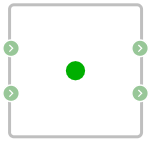
Block appearance in REPEAT VISION#
The Rotational node block implements the functionality of connecting two or more components.
Note
The number of inputs and outputs of the block is specified by the user:
by default the number of output ports - 2;
by default the number of output ports - 2;
minimum value of input ports - 1;
minimum value of output ports - 1;
maximum value of input ports - 100;
The maximum value of output ports - 100.
1. Properties#
Property |
Default value |
Description |
Units of measurement |
|---|---|---|---|
2 |
Sets the number of input ports |
- |
|
2 |
Sets the number of output ports |
- |
2. Inputs and outputs#
Parameters |
Input/Output |
Description |
Units of measurement |
Port type |
|---|---|---|---|---|
Input |
Input |
The number of inputs is set in the |
- |
Rotational motion |
Input |
Input |
The number of inputs is set in the |
- |
Rotational motion |
Output |
Output |
The number of outputs is set in the |
- |
Rotational motion |
Output |
Output |
The number of outputs is set in the |
- |
Rotational motion |
In order to see the connection capabilities of the block, you need to go to page Description of blocks ports