

Model control panel (controller)#
The model control panel (controller) is located at the top center of the canvas. This panel is responsible for managing the execution of the user task in the runtime system (simulation mode). When the circuit is ready for modeling, that is, all connections have been created and property values have been entered, parameters have been configured, it can be switched to calculation mode by clicking the PLAY icon  .
If errors are detected on the circuit, a short message will be displayed under the integrated control panel, and a detailed entry about this error will appear in the Journal. If the scheme is correct, a new calculation task appears in the container with the model, and it is launched for execution (the status RUN lights up on the panel  and the simulation time countdown begins, see Fig. 1 below).

Fig. 1 Running a user task for execution#
In this case, the STOP  and
PAUSE  icons become available:
STOP– stops the task in the model (terminates the process) and disconnects all consumers (data tables, visualizations, reports) from the task;
STOP occurs in two stages:
The simulation stops, saving the calculation data. The DATA indicator turns red. When you hover over the STOP icon
a window appears with information about what will happen if you click this button again Fig. 2:
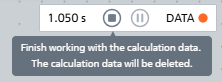
Fig. 2 The first stage of the STOP button operation#

Fig. 3 The second stage of the STOP button operation#
PAUSE– pauses the task, stops visualization and the receipt of new calculation data, but the task remains in memory and the calculation process will immediately continue when you clickPLAY.