

Servo motor#
Block appearance in REPEAT VISION#
The Servo motor block describes the connection of the servo with the Arduino Nano, Uno and Mega boards.
In the Servo motor Modes block property, one of the modes in which the servo drive can operate is selected:
StepMode;ContinuousRotation;ClearPositioning;MicrosecondMode.
The Motion delay property records the time for which the servo rotation is delayed.
When using multiple servos in a single model, the Servo motor name property is used to specify a unique name for each servo in the model.
&emsp
Arduino Nano and Uno;
Arduino Mega;
Driver.
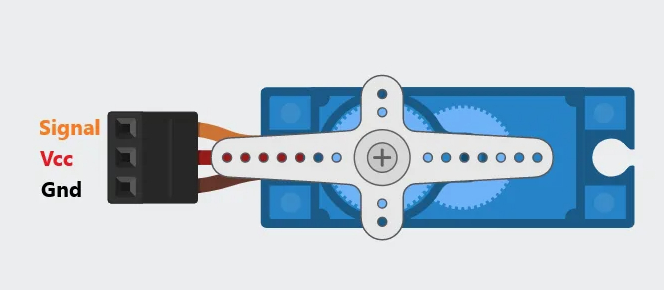
Fig. 1 Servo pin designation#
Board name |
Свойство где указан номер пинов подключения сервоприводов |
The property where the number of servo drive connection pins is specified |
|---|---|---|
Arduino Nano |
3, 5, 6, 9, 10, 11 |
|
Uno |
3, 5, 6, 9, 10, 11 |
|
Arduino Mega |
from 2 to 13, from 44 to 46 |
Note
When selecting the driver connection board (Driver), the pin number of the servo drive connection to the driver is fed as a number to the block input.
Important
When selecting the boards in the Connection board property Arduino Nano, Uno and Mega, the servo is connected directly to the physical board. In case of selecting Driver, the servo is connected to the driver module, and that in turn to the control board.
Important
The following values can be supplied to the block input:
servo drive rotation angle in the range from 0 to 180 ̊ ;
servo positions in the range from 500 (0 ̊ ) to 2500 (180 ̊ ) µs.
1. Properties#
Property |
Default Value |
Description |
Units of measurement |
|---|---|---|---|
Servo motor Modes/a>: |
StepMode |
- |
- |
100 |
Servo rotation delay time |
ms |
|
Connection board: |
ArduinoNano&UNO |
Type of control board for connecting a servo drive |
- |
Servo pin number of Arduino Nano and UNO boards: |
3 |
Pin numbers of the Arduino Nano and Uno boards that the servo can be connected to |
- |
Servo pin number of Arduino Mega, available when selecting |
9 |
Arduino Mega pin numbers where a servo can be connected |
- |
servo |
Unique name of the servo on the model |
- |
2. Inputs and outputs#
Parameters |
Input/Output |
Description |
Units of measurement |
Port type |
|---|---|---|---|---|
Input |
Input |
- |
- |
Automation |
Output |
Output |
- |
- |
Automation |
In order to see the connection capabilities of the block, you need to go to page Description of block ports
3. Code generation#
Important
Block supports C source code generation
See also
An example of using this block can be found in section Code generation practical guide Description of the structure of the REPEAT VISION code generator source code