

Compare to Zero#
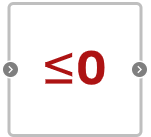
Block appearance in REPEAT VISION#
Block Compare to zero compares the input signal to zero. The output is 0 if the comparison is false, and 1 if it is true. Constant 4 changes the comparison operation (0 to 4):
0 |
\(\leq\) |
|---|---|
1 |
= |
2 |
< |
3 |
\(\geq\) |
4 |
> |
1. Properties#
Property |
Default Value |
Description |
Units of measurement |
|---|---|---|---|
Compare operator |
0 |
Operator – selected by number |
- |
2. Inputs and outputs#
Parameters |
Input/Output |
Description |
Units of measurement |
Port type |
|---|---|---|---|---|
Input |
Input |
- |
- |
Automation |
Output |
Output |
Comparison result in |
- |
Automation |
In order to see the connection capabilities of the block, you need to go to page Description of block ports
3. Code generation#
Important
Block supports C source code generation
Hint
The block supports displaying values of coefficients on blocks instead of an image of the block itself