

Approximation model#
Appearance of the approximation model launching block#
The Approximation model block is intended for use on the REPEAT VISION platform of the set approximation models:
Neural networks, which are part of the algorithms of machine learning;
Gaussian processes;
Linear and nonlinear regression models.
Approximation Models can contain any nonlinear relations between the input parameters of the Model and calculation results that are difficult to describe by a software algorithm and require modern approaches such as neural networks and other machine learning methods.
The block is designed to call ((Inference)) approximation model and enable communication with other blocks of the project during the simulation process.
Approximation Model block loads the model from the neutral format ONNX.
See also
Read the simple tutorial to learn how to create, configure and save approximation models in ONNX format for use on the REPEAT VISION platform.
For a deeper understanding of the techniques used in physically-informed neural network (PINN) models, please refer to the how-to, which provides an example of adding a multidimensional object to the REPEAT VISION platform.
1. Approximation model requirements#
1.1. Tool requirements#
The model can be created using any tool or programming language that saves the model to ONNX format.
The current list of tools and programs that support saving the model to ONNX format is given on the official ONNX website. The table below lists the most popular tools.
Tool |
Description |
|---|---|
Framework for creating machine learning models, Gaussian processes and Python regression models. |
|
Frameworks for creating Python machine learning models. |
|
A package for creating machine learning models, Gaussian processes and Python regression models. |
|
Tool for creating machine learning models, loading and saving models to ONNX format in the MATLAB. |
|
Models Download and Save Tool to ONNX format in WOLFRAM |
1.2. Approximation model parameter requirements#
The approximation model should have at least one input parameter and one output parameter with calculation results.
The input and output parameters of the approximation model shall have type TensorProto.DOUBLE.
Hint
When creating an approximation model using Python, make sure that one of the following parameter types is used: np.float64 , torch.float64, torch.double, tf.float64, tf.double.
1.3. Parameter dimension requirements#
Input and output parameters of the approximation model must have [1, 1] dimension. This means that each parameter shall be an array containing 1 row and 1 column. Each parameter stores 1 real value of TensorProto.DOUBLE.
Hint
If the approximation model is created using Python and PyTorch, make sure that [1, 1] dimension of the parameter is used, as in the example below.
x = torch.tensor([[0.0]], dtype = torch.float64)
print(x.shape)
# torch.Size([1, 1])
1.4. Other#
When saving a model file, use {bdg-primary-line} ‘onnx’ extension, such as model.onnx.
2. Loading approximation model#
It is necessary to move the file with the extension onnx to the area for downloading or use the button Download .onnx.
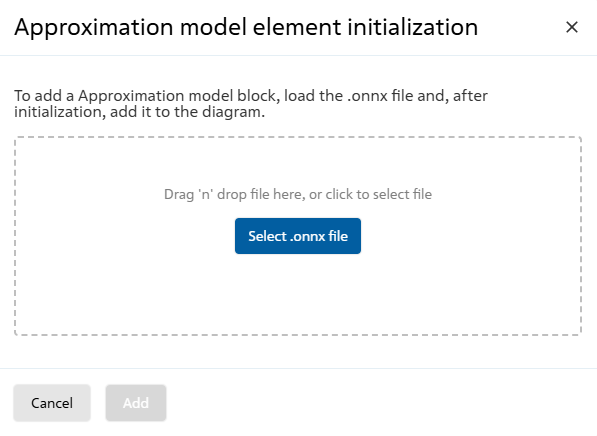
Initialization window for the Approximation model block#
After loading, the block will automatically determine the number of input and output ports of the model and their names.
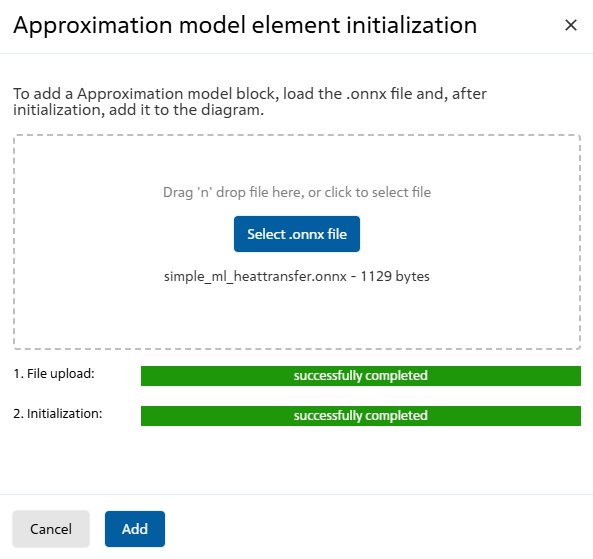
The result of initialization execution#
3. Properties#
Нет
4. Inputs and outputs#
Parameters |
Input/Output |
Description |
Units of measurement |
Port type |
|---|---|---|---|---|
- |
Input |
The list of input ports is generated based on the information about the set of input parameters of the model from the ONNX file |
– |
Automation |
- |
Output |
The list of output ports is generated based on information about the set of output parameters (calculation results) of the model from the ONNX file |
– |
Automation |
4.1. Inputs#
All input parameters of the approximation model are associated with the input ports of the block. Thus, Approximation Model block generates a number of input ports equal to the number of model input parameters.
Each input port of a block should receive a real value from other blocks in the project, e.g. from the {bdg-danger-lineConstant block.
If the approximation model uses 2 input parameters, then 2 associated input ports will be created in the block. Both input ports shall receive real values from other blocks in the project.
4.2. Outputs#
In the block, it is necessary to select at least one output port, linking it to the output parameter of the model calculation results.
If the approximation model uses 3 output parameters of the calculation results, then 1, 2, or all 3 output parameters of the model can be linked to the output port of the block.
5. Examples of use#
Examples of using this block can be found in the following sections:
Tutorials;
Description of Demo.
How-to guides
Section |
Guide name |
|---|---|
Machine learning approximation |
Solving the two-dimensional unsteady-state heat equation with PINN; |