

REST API#
Web-interface of REPEAT VISION platform allows to interact with user programs, which can be created using any programming languages supporting interaction between programs through the web by REST approach.
The following is reference for REPEAT VISION web-interface.
Important
REPEAT VISION web-interface help uses the application address https://app.repeat.vision
If the enterprise uses REPEAT VISION distribution, the application address will be as specified in BASE_URL line in conf.env file.
1. List of projects#
The interface returns a list of projects available to the user to simulate and edit.
Address
https://app.repeat.vision/backend/api/v1/public/project/getAll
1.1. Request#
Method GET
Header of request Header
Key - type string |
Value - type string |
|---|---|
|
|
The user_token_value header value is required to be replaced with a unique API key, which the user can get in API keys section of the personal account.
1.2. Response#
Response Body Body
The request response is JSON structure of the following form.
[
   {
      "userId": 1,
      "projectId": 1,
      "createdAt": "DATE",
      "updatedAt": "DATE",
      "projectName": "NAME",
   }
]
Each { } record contains information about one project in the form of key - value pairs.
The record description for each REPEAT VISION project is summarized in the table given below.
Key - type string |
Value description |
Value type |
|---|---|---|
|
User ID in REPEAT VISION |
Integer |
|
Unique project ID |
Integer |
|
Date of project creation |
String |
|
Date of last project update |
String |
|
Project name assigned by the user |
String |
An example of REPEAT VISION platform response to a request when a user has 1 project available to simulate and edit with name [DEMO] EV.
[
   {
      "userId": 1234,
      "projectId": 456,
      "createdAt": "2024-03-04T10:15:31.546814Z",
      "updatedAt": "2024-03-15T07:53:57.069585Z",
      "projectName": "[DEMO] EV",
   }
]
Example of projects list request in Python
import requests
from requests.exceptions import HTTPError
from requests.auth import AuthBase

class APIKeyAuth(AuthBase):
  """API-Key авторизация для запросов модулем requests"""
  def __init__(self, token : str):
    self.token = token

  def __call__(self, request):
    request.headers["Api-Key"] = f"Api-Key {self.token}"
    return request

url = "https://app.repeat.vision/backend/api/v1/public/project/getAll"
token = "требуется_заменить_данную_строку_на_API_ключ_из_личного_кабинета"
try:
  response = requests.get(
    url,
    auth = APIKeyAuth(token)
    )
  response.raise_for_status()

except HTTPError as error:
  raise error("Возникла ошибка на этапе запроса списка проектов")

else:
  projects = response.json()

print(projects)
# [
#   {
#     "userId": 1234,
#     "projectId": 456,
#     "projectName": "[DEMO] EV",
#     ...
2. Model status#
The interface returns information about the calculation process status of the selected model.
Address
https://app.repeat.vision/backend/api/v1/public/model/statusModel
2.1. Request#
Method GET
Header of request Header
Key - type string |
Value - type string |
|---|---|
|
|
|
|
The description of how to generate a value for Api-Key key see in section list of projects.
The value of user_project_id header required to be replaced with the string value of REPEAT VISION project identifier. The ID of required project can be obtained by the following ways:
In the project description when working directly on the project,
In project management section in
...menu of actions with project.In GET request list of projects through web-interface.
Note
For detailed description of getting the project ID from graphical interface of REPEAT VISION application, see in our tutorial.
2.2. Response#
Response Body Body
The request response is JSON structure. The body of response contains { } record with a key of string type of the following form.
{
  "statusModel" : "VALUE"
}
Key - type string |
Value description |
Value type |
|---|---|---|
|
Process status of the selected model calculation |
String |
"statusModel" can take values according to the table below.
Value of statusModel |
Description |
|---|---|
“0” |
Calculation successfully completed by condition (block instruction STOP, etc.) |
“1” |
Calculation in progress |
“2” |
Calculation stopped by the user from graphical interface |
“3” |
Calculation is stopped by clicking PAUSE |
“20” |
Failed to start calculation. The solver did not find the project |
“21” |
The calculation is successfully completed by the simulation time set in project settings |
“51” |
Calculation is not completed due to limited RAM memory |
“52” |
Calculation is not completed due to memory limitations |
“100” |
An error occurred in the calculation process |
Example of response body
{
  "statusModel" : "21"
}
Error codes of HTTP responses
Code |
Description |
Recommendations for correction |
|---|---|---|
410 |
Model calculation has not been started. Or connection to solver lost |
Need to start model calculation |
Python example of a model status request
import requests
from requests.exceptions import HTTPError
from requests.auth import AuthBase

class APIKeyAuth(AuthBase):
  """API-Key авторизация для запросов модулем requests"""
  def __init__(self, token : str):
    self.token = token

  def __call__(self, request):
    request.headers["Api-Key"] = f"Api-Key {self.token}"
    return request

url = "https://app.repeat.vision/backend/api/v1/public/model/statusModel"
token = "требуется_заменить_данную_строку_на_API_ключ_из_личного_кабинета"
project = 456 # Требуется заменить данный номер на идентификатор вашего проекта
try:
  response = requests.get(
    url,
    auth = APIKeyAuth(token),
    headers = {"ProjectId" : str(project)}
    )
  response.raise_for_status()

except HTTPError as error:
  raise error("Возникла ошибка на этапе запроса состояния модели")

else:
  status = response.json()

print(status)
# {
#   "statusModel": "1"
#  }
3. Global variable list#
The interface returns a global variable list previously added when the model was created.
Address
https://app.repeat.vision/backend/api/v1/public/model/globals
3.1. Request#
Method GET
Header of request Header
Key - type string |
Value - type string |
|---|---|
|
|
|
|
The description of how to generate a value for Api-Key key see in section list of projects.
For description of value generation for ProjectId key see in section model status.
3.2. Response#
Response Body Body
The response to the request is JSON structure. In body response contains a record { } of the following form.
{
    "VARIABLE_NAME" : "VALUE"
 }
Keys description |
Values description |
|---|---|
String of global variable name |
String of global variable value at creation time |
An example of REPEAT VISION platform response to a request for a list of model variables.
{
  "density": "998.21",
  "pressure": "50000"
  }
Python example of requesting a list of model variables
import requests
from requests.exceptions import HTTPError
from requests.auth import AuthBase

class APIKeyAuth(AuthBase):
  """API-Key aвторизация для запросов модулем requests"""
  def __init__(self, token : str):
    self.token = token

  def __call__(self, request):
    request.headers["Api-Key"] = f"Api-Key {self.token}"
    return request

url = "https://app.repeat.vision/backend/api/v1/public/model/globals"
token = "требуется_заменить_данную_строку_на_API_ключ_из_личного_кабинета"
project = 456 # Требуется заменить данный номер на идентификатор вашего проекта
try:
  response = requests.get(
    url,
    auth = APIKeyAuth(token),
    headers = {"ProjectId" : str(project)}
    )
  response.raise_for_status()

except HTTPError as error:
  raise error("Возникла ошибка на этапе запроса списка переменных модели")

else:
  variables = response.json()

print(variables)
# {
#   "density": "998.21",
#   "pressure": "50000"
#  }
4. Availability of calculation modules#
The interface returns information about the availability of available calculation modules. This request is recommended for use in the following cases:
The number of users who run models for calculation exceeds the available number of calculation modules on the REPEAT VISION platform. In such a case, waiting for a free calculation module is allowed;
Performing parametric studies, solving optimization problems or performing calculation cycles in the REPEAT VISION platform distribution in the local enterprise network with a limited number of available calculation modules. In this case, it is necessary to wait for at least one available calculation module.
Address
https://app.repeat.vision/backend/api/v1/public/controllervm/status
4.1. Request#
Method GET
Header of request Header
Key - type string |
Value - type string |
|---|---|
|
|
The description of how to generate a value for Api-Key key see in section list of projects.
4.2. Response#
Response Body Body
The response to the request is JSON structure. In body response contains a record { } of the following form.
{
    "isAvailableSolvers" : true
 }
Key - type string |
Value description |
Value type |
|---|---|---|
|
Availability of available calculation modules. If the value is |
Boolean value |
Example of querying the number of calculation modules in Python
import requests
from requests.exceptions import HTTPError
from requests.auth import AuthBase

class APIKeyAuth(AuthBase):
  """API-Key авторизация для запросов модулем requests"""
  def __init__(self, token : str):
    self.token = token

  def __call__(self, request):
    request.headers["Api-Key"] = f"Api-Key {self.token}"
    return request

url = "https://app.repeat.vision/backend/api/v1/public/controllervm/status"
token = "требуется_заменить_данную_строку_на_API_ключ_из_личного_кабинета"
try:
  response = requests.get(
    url,
    auth = APIKeyAuth(token)
    )
  response.raise_for_status()

except HTTPError as error:
  raise error("Возникла ошибка на этапе запроса количества расчётных модулей")

else:
  status = response.json()

print(status)

#   {
#     "isAvailableSolvers": True
#    }
5. Start model calculation#
The interface allows to send a command to start the REPEAT VISION model calculation with the option to manage the following project settings:
Values of global model variables;
Real-time synchronization flag;
Simulation time;
Integration step;
Discretization step.
Address
https://app.repeat.vision/backend/api/v1/public/model/run
Important
When using REPEAT VISION model calculation start interface in your program cycles, it is required to stop the calculation at the stage of cycle completion with clearing of calculation results and with termination of the calculation module. For description of the corresponding request, see section Stop the calculation and clear the results
5.1. Request#
Method POST
Header of request Header
Key - type string |
Value - type string |
|---|---|
|
|
|
|
The description of how to generate a value for Api-Key key see in section list of projects.
For description of value generation for ProjectId key see in section model status.
Header of request Body
The request body is JSON structure of the following form.
{
  "header" : {
    "globalVariables" : {
      "NAME" : "VALUE"
    },
    "isRealTimeSync" : true,
    "modellingTime" : "100",
    "integrationStep" : "50",
    "discretizationStep" : "50"
  }
}
Changed in version 2.6.0: The settings for starting the model calculation shall be contained in the { } record with "header" key.
Global variables of the REPEAT VISION model are described in the { } record by the "globalVariables" key.
The value for "globalVariables" shall also be { } record with information about all actual global variable values passed to the model as described in the table given below.
Keys description |
Values description |
|---|---|
Name string of an existing global variable in the model |
String of new global variable value |
All keys and values of the structure shall be of type string.
Changed in version 2.6.0: When starting the model, it is required to pass the values of all global variables present in the project. Otherwise, the REPEAT VISION platform will return response with error code 400.
Warning
This web-interface is not designed to create global variables. Web-interface allows passing values of global variables [already existing in the model] (#ref-web-api-globals).
An example of a request body containing the values of global model variables. The request body will allow to run the model.
{
  "header" : {
    "globalVariables": {
    "density": "500.1",
    "pressure": "10000"
    }
  }
}
At the same time, the rest of the settings (real time synchronization flag, simulation time, integration and discretization step) will be used by the REPEAT VISION platform from a previously saved project.
Added in version 2.6.0: The body of the request to run the model for calculation can contain a real time synchronization flag, simulation time, integration step and discretization step.
Key - type string |
Value description |
Value type |
|---|---|---|
|
Real time synchronization. With synchronization off, the calculation will be done as fast as possible and is usually ahead of real time. With synchronization on, one step of model time will approximately correspond to one step of real time. With a large amount of calculations, the model time may lag behind the real |
Logical type |
|
Value of the simulation time (dimension of the value - seconds), after which the calculation will be stopped |
String |
|
The integration step value (the dimension of the value is milliseconds) between adjacent calculated model states |
String |
|
The value of the time step (the dimension of the value is milliseconds) between the nearest entries of the calculation results in the database |
String |
Important
If you need to use the settings for the simulation time, integration step or time step between the nearest entries of the calculation results into the database, then you need to pass values to the request body to three mandatory keys: "modellingTime", "integrationStep", "discretizationStep".
Otherwise, the settings are used from the previously saved REPEAT VISION project.
The simulation time, integration step and discretization step shall be set according to the validation rules of the REPEAT VISION graphic application.
An example of a request body containing global model variable values, simulation time settings, integration step, discretization step and real time synchronization flag. The request body will allow to run the model for calculation.
{
  "header" : {
    "globalVariables": {
    "density": "500.1",
    "pressure": "10000"
    },
    "isRealTimeSync" : true,
    "modellingTime" : "100",
    "integrationStep" : "50",
    "discretizationStep" : "50"
  }
}
5.2. Response#
When starting a model for calculation, REPEAT VISION platform generates a response with a list of blocks present in the scheme.
Response Body Body
The request body is JSON structure of the following form.
{
    "elements" : {
         "BLOCK_ID_NUMBER_1" : {
            "customName" : "INPUT_USER_NAME_VALUE",
            "params" : [
               {
                   "description" : "Input",
                   "name" : "in_1",
                   "modelName" : "1708415414912_IN_1",
                   "value" : "",
                   "unit" : ""
               }
           ]
         },
         "BLOCK_ID_NUMBER_2" : {
            "params" : [
               {
                   "description" : "Value",
                   "name" : "out_1",
                   "modelName" : "1708415430657_OUT_1",
                   "value" : "",
                   "unit" : ""
               }
           ]
         }
    }
}
Key - type string |
Value - record type |
|---|---|
|
Set of REPEAT VISION model blocks |
The description of { } record with REPEAT VISION model block set is summarized in the table given below.
Key - type string |
Value - record type |
|---|---|
Block identifier |
Block attributes |
Note
A description of how to get the block ID in REPEAT VISION graphical interface is given in section below
The description of block attributes is given in the table below.
Key - type string |
Value |
Value type |
|---|---|---|
|
Custom name is applied only for Output port block |
string |
|
Set of block parameters |
list |
Attention
If the block is not an output port, then the { } response record will not have a key "customName"
The block description is given in the table below.
Key - type string |
Value - type string |
|---|---|
|
Parameter description. Examples of values: “Input”, “Output”, “Mass flow” |
|
Parameter name. The name begins with the prefix |
|
Parameter ID. The value consists of a prefix as the block identifier and a root as the parameter name |
|
Parameter value. Filled in at the end of the calculation step. Empty value at the start of the calculation. |
|
Unit of measurement of the parameter value |
Note
A description of how to get the parameter ID in REPEAT VISION graphical interface is given in section below
Example of response body
{
    "elements" : {
        "1713869940863": {"index": 0,
                          "params": [{"description": "Mass flow",
                                      "name": "out_1",
                                      "modelName": "1713869940863_OUT_1",
                                      "value": "",
                                      "unit": "kg/s"}]},

        "1713869965162": {"index": 0, "params": []},

        "1714987426651": {"index": 0,
                          "customName": "FlowRate",
                          "params": [{"description": "Input",
                                      "name": "in_1",
                                      "modelName": "1713869940863_OUT_1",
                                      "value": "",
                                      "unit": ""}]}},
}
Error codes of HTTP responses
Code |
Description |
Recommendations for correction |
|---|---|---|
400 |
The model contains errors in circuit implementation or block settings. |
Check your model in REPEAT VISION application. Run the model for calculation from the REPEAT VISION graphic interface, analyze the messages in the application log |
400 |
In the record for |
Check the passed set of variables for compliance with the existing set of global model variables |
403 |
There are no rights to use REPEAT VISION platform modules. In the body of the response lists the modules for which there is no right to use. |
Contact technical support to activate modules |
423 |
The model is already in calculation process |
Stop the previously started calculation and start your program again |
504 |
Network problems when starting a model for calculation |
Try to restart the calculation |
510 |
All calculation modules are active |
It is necessary to free the calculation module for your model |
Example of Python request to start REPEAT VISION model calculation process
import requests
from requests.exceptions import HTTPError
from requests.auth import AuthBase

class APIKeyAuth(AuthBase):
  """API-Key aвторизация для запросов модулем requests"""
  def __init__(self, token : str):
    self.token = token

  def __call__(self, request):
    request.headers["Api-Key"] = f"Api-Key {self.token}"
    return request

url = "https://app.repeat.vision/backend/api/v1/public/model/run"
token = "требуется_заменить_данную_строку_на_API_ключ_из_личного_кабинета"
project = 456 # Требуется заменить данный номер на идентификатор вашего проекта
# Требуется заменить имена и значения исходных данных на соответствующие значения глобальных переменных вашей модели
input_data = {
  "header" : {
    "globalVariables" : {
      "density": "500.1",
      "pressure": "10000"
    },
    # 4 следующих параметра допускается исключить из запроса,
    # если настройки времени и шагов нужно использовать из ранее сохранённого проекта
    "isRealTimeSync" : True,
    "modellingTime" : "100",
    "integrationStep" : "50",
    "discretizationStep" : "50"
  }
}
try:
  response = requests.post(
    url,
    auth = APIKeyAuth(token),
    json = input_data,
    headers = {"ProjectId" : str(project)}
    )
  response.raise_for_status()

except HTTPError as error:
  raise error("Возникла ошибка на этапе запуска процесса расчёта")

else:
  return response.json()
6. Solver performing simulation#
Interface for obtaining information about the calculation module that is busy performing the model calculation.
Address
https://app.repeat.vision/backend/api/v1/public/controllervm/getUserVM
Important
In order to successfully obtain information about the calculation module, it is required to pre-start REPEAT VISION model calculation using one of the following options:
From REPEAT VISION application interface to calculate the model by clicking
Start simulationFrom web API by request to start model for calculation
6.1. Request#
Method GET
Header of request Header
Key - type string |
Value - type string |
|---|---|
|
|
The description of how to generate a value for Api-Key key see in section list of projects.
6.2. Response#
The response generates a description of REPEAT VISION calculation module.
Response Body Body
The request body is JSON structure of the following form.
{
  "addr" : "10.151.201.142",
  "portSolver" : "8000",
  "solverType" : "mdcore",
  "userId" : 1234,
  "projectId" : 567
}
The description of keys and values with information about REPEAT VISION calculation module is given in the table below.
Key - type string |
Value |
Value type |
|---|---|---|
|
Solver address performing simulation |
String |
|
Solver port |
String |
|
Solver type |
String |
|
User ID started the calculation |
Integer |
|
REPEAT VISION project identifier, which is calculated by the solver |
Integer |
The values of "addr" and "portSolver" keys can further be used for the following tasks:
Receiving calculation results
Receiving summary information on calculated parameters of REPEAT VISION model
Error codes of HTTP responses
Code |
Description |
Recommendations for correction |
|---|---|---|
400 |
Model calculation has not been started |
Need to start model calculation |
Example of Python request to get information about solver
import requests
from requests.exceptions import HTTPError
from requests.auth import AuthBase

class APIKeyAuth(AuthBase):
  """API-Key aвторизация для запросов модулем requests"""
  def __init__(self, token : str):
    self.token = token

  def __call__(self, request):
    request.headers["Api-Key"] = f"Api-Key {self.token}"
    return request

url = "https://app.repeat.vision/backend/api/v1/public/controllervm/getUserVM"
token = "требуется_заменить_данную_строку_на_API_ключ_из_личного_кабинета"
try:
  response = requests.get(
    url,
    auth = APIKeyAuth(token)
    )
  response.raise_for_status()

except HTTPError as error:
  raise error("Возникла ошибка на этапе запроса информации о расчётном модуле")

else:
  return response.json()
7. Calculated values of model parameters#
The interface returns all available information about results of REPEAT VISION model parameters
Address
https://app.repeat.vision/backend/api/v1/public/model/parameters/getAll
7.1. Request#
Method GET
Header of request Header
Key - type string |
Value - type string |
|---|---|
|
|
|
|
The "addressVM" key requires a value with information about the solver performing the simulation. The values of address address and port port shall be received in advance by requesting the solver to be used. See the table describing the address and port response of the solver above.
The description of how to generate a value for Api-Key key see in section list of projects.
7.2. Response#
Response Body Body
The response to the request contains information about blocks, parameters and calculated parameter values in the following JSON structure
{
  "Model" : {
    "StatusModel": 1,
    "TimeModel": 300.0
  },
  "Elements" : {
    "1713869811928": {
      "1713869811928_OUT_2": 0.0,
      "1713869811928_IN_1": 0.0,
      "Name": "1713869811928"
      }
  }
}
The following keys and values are used at structure root
Key - type string |
Value - record type |
|---|---|
|
Brief information about the model condition |
|
Summary of actual values of model parameters |
The model status information contains the following values
Key - type string |
Value |
Value type |
|---|---|---|
|
Status of model calculation process |
Integer |
|
Simulation time of calculation process in milliseconds at the request time |
Real |
Note
For a detailed description of model calculation process states, please see in corresponding table
Information about the model blocks available by "Elements", key is given in the table below
Key - type string |
Value - record type |
|---|---|
Block identifier |
Block parameters |
The block identifier can be found in REPEAT VISION graphical interface. When choosing the required block, the identifier will be displayed in block settings, as shown in the figure below.
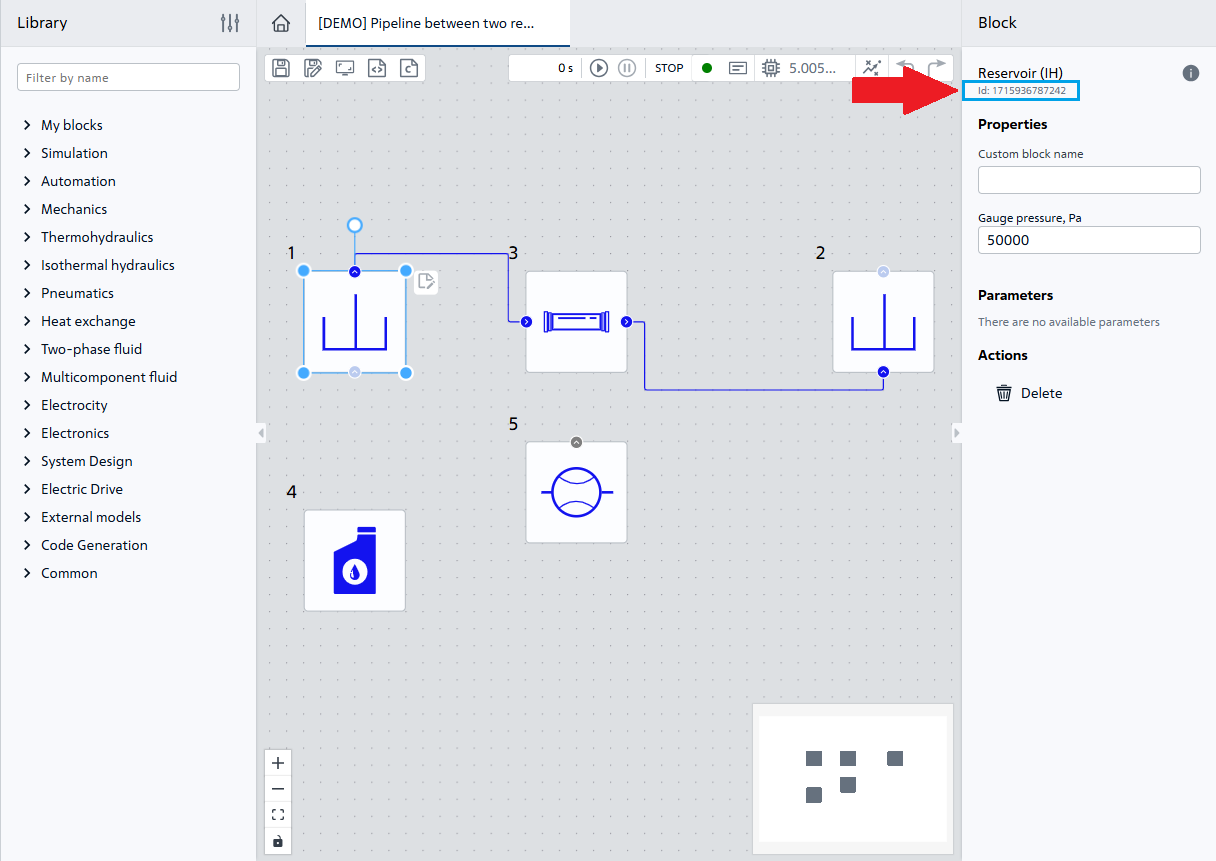
When specifying the block identifier as the key, summary information about the block parameters is available according to the table given below
Key - type string |
Value |
Value type |
|---|---|---|
Identifier parameter |
Calculated value of block parameter |
Real |
|
The name value corresponds to the block identifier, e.g., |
String |
|
Calculated parameter value for input or output port |
Real |
Parameter identifier is available in REPEAT VISION application. The parameter identifier will be displayed in the selected block settings after the model is started for calculation, as shown in the figure below.
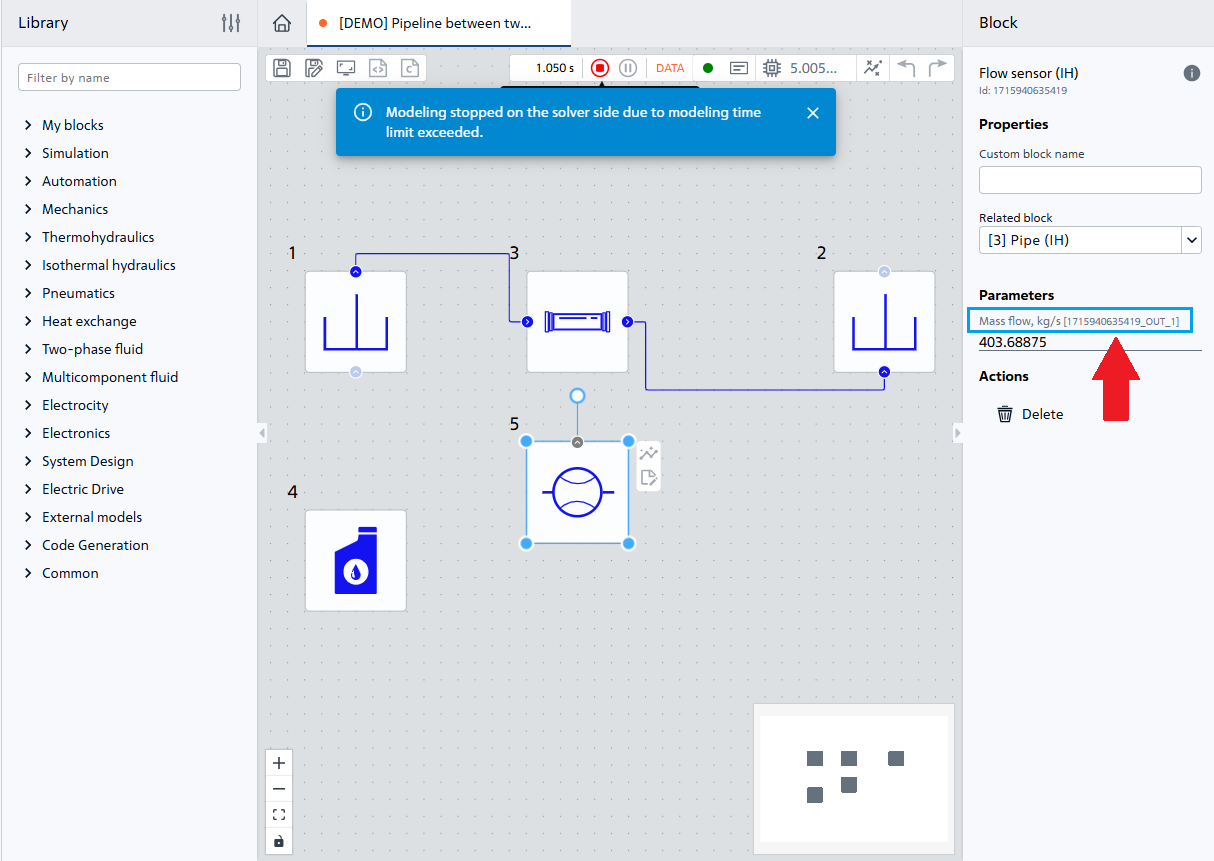
Example of response
{
  "Model" : {
    "StatusModel": 1,
    "TimeModel": 300.0
  },
  "Elements" : {
    "1714987426651": {
      "1713869940863_OUT_1": -4378.034,
      "Port": -4378.034,
      "Name": "1714987426651"
      },
    "1713869809228": {
      "1713869809228_IN_1": -4378.034,
      "1713869809228_OUT_2": 50000.0,
      "Name": "1713869809228"
      },
    "1713869965162": {
      "Name": "1713869965162"
      }
  }
}
Error codes of HTTP responses
Code |
Description |
Recommendations for correction |
|---|---|---|
100 or 101 |
The calculation of REPEAT VISION model has been stopped |
Need to start a model calculation using the graphical application REPEAT VISION to debug the model |
Example of Python request for calculated parameter values
import requests
from requests.exceptions import HTTPError
from requests.auth import AuthBase

class APIKeyAuth(AuthBase):
  """API-Key aвторизация для запросов модулем requests"""
  def __init__(self, token : str):
    self.token = token

  def __call__(self, request):
    request.headers["Api-Key"] = f"Api-Key {self.token}"
    return request

url = "https://app.repeat.vision/backend/api/v1/public/model/parameters/getAll"
token = "требуется_заменить_данную_строку_на_API_ключ_из_личного_кабинета"
# Значение переменных address и port требуется подготовить на основе
# результата запроса о расчётном модуле, выполняющего моделирование
address = "10.151.201.142"
port = "8000"
try:
  response = requests.get(
    url,
    auth = APIKeyAuth(token),
    headers = {"addressVM" : f"{address}:{port}"}
    )
  response.raise_for_status()

except HTTPError as error:
  error("Возникла ошибка на этапе запроса расчётных значений параметров")

else:
  return response.json()
8. Results#
The interface returns a time series of calculation results for a given model parameter.
Address
https://app.repeat.vision/backend/api/v1/public/model/parameters/getRange
8.1. Request#
Method POST
Header of request Header
Key - type string |
Value - type string |
|---|---|
|
|
|
|
The "addressVM" key requires a value with information about the solver performing the simulation. The values of address address and port port shall be received in advance by requesting the solver to be used. See the table describing the address and port response of the solver above.
The description of how to generate a value for Api-Key key see in section list of projects.
Header of request Body
Key - type string |
Value |
Value type |
|---|---|---|
|
Identifier parameter |
String |
|
Initial moment of the time interval in milliseconds |
Integer |
|
End moment of the time interval in milliseconds |
Integer |
Note
The method of obtaining the parameter identifier in REPEAT VISION graphical interface is given in section above
Example of request body
{
  "varName" : "1713869940863_OUT_1",
  "timeStart" : 0.0,
  "timeEnd" : 1050.0
}
8.2. Response#
Response Body Body
The response to the request contains a time series of calculation results for a given model parameter in the following JSON structure
{
  "searchSpan" : {
      "varName" : "1713869940863_OUT_1",
      "timeStart" : 0.0,
      "timeEnd" : 1050.0
                },
  "dataValues" : [
      0.0,
      403.68878,
      403.68875,
      403.68875
                ],
  "dataTimes" : [
      0.0,
      50.0,
      100.0,
      1000.0
               ]
  }
The following keys and values are used at structure root
Key - type string |
Value |
Value type |
|---|---|---|
|
Information about the requested parameter with calculation results |
Record |
|
Time series of values of parameter calculation results |
List |
|
Time values for the corresponding parameter values |
List |
The keys and values of "searchSpan" record correspond to Body, request described in the section above.
By "dataValues" key in [ ] list the values (real numbers) of parameter calculation results are available for their corresponding time values (real numbers) for "dataTimes" key.
Error codes of HTTP responses
Code |
Description |
Recommendations for correction |
|---|---|---|
406 |
Calculation of parameter values for the specified time interval has not been performed |
It is required to repeat the request later. It is recommended to estimate the waiting time for computation completion when debugging the model via REPEAT VISION graphical interface |
410 |
Model calculation has not been started. Or connection to solver lost |
Stop the calculation by force and restart the calculation. |
Python example of requesting parameter calculation result
import requests
from requests.exceptions import HTTPError
from requests.auth import AuthBase

class APIKeyAuth(AuthBase):
  """API-Key aвторизация для запросов модулем requests"""
  def __init__(self, token : str):
    self.token = token

  def __call__(self, request):
    request.headers["Api-Key"] = f"Api-Key {self.token}"
    return request

url = "https://app.repeat.vision/backend/api/v1/public/model/parameters/getRange"
token = "требуется_заменить_данную_строку_на_API_ключ_из_личного_кабинета"
# Значение переменных address и port требуется подготовить на основе
# результата запроса о расчётном модуле, выполняющего моделирование
address = "10.151.201.142"
port = "8000"
# Значения словаря требуется заполнить в соответствии с вашими
# пожеланиями к результату расчёта параметра модели REPEAT VISION
parameter = {
  "varName" : "NESTED_BLOCK_ID_OUT_INDEX",
  "timeStart" : 0.0,
  "timeEnd" : 10_000.0,
}
try:
  response = requests.post(
    url,
    auth = APIKeyAuth(token),
    json = parameter,
    headers = {"addressVM" : f"{address}:{port}"}
    )
  response.raise_for_status()

except HTTPError as error:
  error("Возникла ошибка на этапе запроса результатов расчёта параметра")

else:
  return response.json()
9. Calculation process log#
The interface transmits a text description of the model calculation process.
Address
https://app.repeat.vision/backend/api/v1/public/model/status
9.1. Request#
Method GET
Header of request Header
Key - type string |
Value - type string |
|---|---|
|
|
|
|
The description of how to generate a value for Api-Key key see in section list of projects.
For description of value generation for ProjectId key see in section model status.
9.2. Response#
Response Body Body
The response to the request contains a description of calculation process and model summary information in the following JSON structure
{
    "stack": "MULTILINE_MESSAGES_OF_SOLVING_PROCESS",
  }
Key - type string |
Value - type value |
|---|---|
|
Multi-string text describing the calculation process. The description includes the date, message levels, and the essence of model calculation process. |
Example Python request for a calculation process log
import requests
from requests.exceptions import HTTPError
from requests.auth import AuthBase

class APIKeyAuth(AuthBase):
  """API-Key aвторизация для запросов модулем requests"""
  def __init__(self, token : str):
    self.token = token

  def __call__(self, request):
    request.headers["Api-Key"] = f"Api-Key {self.token}"
    return request

url = "https://app.repeat.vision/backend/api/v1/public/model/status"
token = "требуется_заменить_данную_строку_на_API_ключ_из_личного_кабинета"
# Значение переменных address и port требуется подготовить на основе
# результата запроса о расчётном модуле, выполняющего моделирование
address = "10.151.201.142"
port = "8000"
try:
  response = requests.get(
    url,
    auth = APIKeyAuth(token),
    headers = {"addressVM" : f"{address}:{port}"}
    )
  response.raise_for_status()

except HTTPError as error:
  error("Возникла ошибка на этапе запроса журнала процесса расчёта модели")

else:
  return response.json()
10. Stop the calculation#
Interface to stop REPEAT VISION model calculation process with an option to upload calculation results
Address
https://app.repeat.vision/backend/api/v1/public/model/softStop
10.1. Request#
Method POST
Header of request Header
Key - type string |
Value - type string |
|---|---|
|
|
|
|
The description of how to generate a value for Api-Key key see in section list of projects.
For description of value generation for ProjectId key see in section model status.
Example Python request to stop the calculation
import requests
from requests.exceptions import HTTPError
from requests.auth import AuthBase

class APIKeyAuth(AuthBase):
  """API-Key aвторизация для запросов модулем requests"""
  def __init__(self, token : str):
    self.token = token

  def __call__(self, request):
    request.headers["Api-Key"] = f"Api-Key {self.token}"
    return request

url = "https://app.repeat.vision/backend/api/v1/public/model/softStop"
token = "требуется_заменить_данную_строку_на_API_ключ_из_личного_кабинета"
project = 456 # Требуется заменить данный номер на идентификатор вашего проекта
try:
  response = requests.post(
    url,
    auth = APIKeyAuth(token),
    headers = {"ProjectId" : str(project)}
    )
  response.raise_for_status()

except HTTPError as error:
  raise error("Возникла ошибка на этапе остановки расчёта модели")
11. Stop the calculation and clear the results#
Interface to stop model calculation process REPEAT VISION with cleaning of calculation results on the solver side, as well as termination of the solver itself.
Address
https://app.repeat.vision/backend/api/v1/public/model/stop
11.1. Request#
Method POST
Header of request Header
Key - type string |
Value - type string |
|---|---|
|
|
|
|
The description of how to generate a value for Api-Key key see in section list of projects.
For description of value generation for ProjectId key see in section model status.
An example in Python, see the section describing the stop calculation
12. Public Import#
Interface for public import of the REPEAT VISION model.
Address
https://app.repeat.vision/backend/api/v1/public/project/import
12.1. Request#
Method POST
Query parameter Query - folderId.
Example request with folderId:
https://app.repeat.vision/backend/api/v1/public/project/import?folderId=efgsdfgsdfg
Request Header Header
Key - type string |
Value - type string |
|---|---|
|
|
|
|
|
|
Content-Range - used when splitting a large file into parts. Before / the range of bytes is indicated, after / the total number of bytes in the file.
The description of how to generate a value for Api-Key key see in section list of projects.
Field file (required) - value binary. Contents of the project file or part of it.
Example request via curl
curl -X 'POST' \
  'https://app.repeat.vision/backend/api/v1/public/project/import' \
  -H 'accept: * / *' \
  -H 'Api-Key: {token}' \
  -H 'Content-Type: multipart/form-data' \
  -F 'file=@project.rpt'
12.2. Response#
Response body Body
The response to the request contains the status, project ID, and project name in the following JSON structure
{
    "status": "completed",
    "projectId": "c6128d47-ffb9-4ff9-bbca-647040ce3cf2",
    "projectName": "BMS"
  }
If the file is split into parts (using Content-Range), then the JSON structures up to the final part of the file look like this:
{
    "uuid": "6827d06e-f120-4374-afa6-9b2e6b70ee04",
    "status": "uploading"
  }
12.3. An example of connecting to REPEAT VISION via the public REST API using Python and the requests package to import a project#
from pathlib import Path
Internal module for working with paths and files
import requests
from repeat.repeat_connection import APIKeyAuth
An external package for REST requests. Installed with repeat.
Initial data
user_api_key = "Paste your key here"
User API key
https://app.repeat.vision/id/account/api-keys
project_path = r"./Truboprovod_s_mestnim_soprotivleniem_import_01.rpt"
The Path to the REPEAT VISION Project
Program code
endpoint = "https://app.repeat.vision/backend/api/v1/public/project/import"
REST API address for uploading the project
project = Path(project_path).read_bytes()
data = { "file" :
        (
          "Truboprovod_s_mestnim_soprotivleniem_import_01.rpt",
          project
          )
  }
response = requests.post(
  endpoint,
  auth = APIKeyAuth(user_api_key),
  files = data,
  verify = False,
  )
print(response.text)
Reading into the byte structure of the REPEAT VISION project file
13. Public Export#
Интерфейс для публичного экспорта модели REPEAT VISION.
Address
https://app.repeat.vision/backend/api/v1/public/project/export
13.1. Request#
Method GET
Request Header Header
Key - type string |
Value - type string |
|---|---|
|
|
ProjectId - you can get it by RMB on the required project in the list and selecting LMB - Copy project id
Example request via curl
curl -X GET 'https://app.repeat.vision/backend/api/v1/public/project/export' \
  -H 'ProjectId: a91ea532-619b-4f21-b6dc-d92aa463f126' \
  -H 'Api-Key: {token}' \
  --output project.rpt
13.2. Response#
Response body Body
The contents of the project file in binary form.
Response Header Header
Key - type string |
Value - type string |
|---|---|
|
|
|
|
|
|