

Reservoir (TL)#
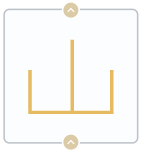
Block appearance in REPEAT VISION#
The Reservoir (TL) block simulates a tank of infinite volume with a given constant value of overpressure and temperature.
In the controlled mode, temperature and pressure can be changed during the calculation process and are set by sending a signal to the respective ports of the block.
1. Properties#
Property |
Default value |
Description |
Units of measurement |
|---|---|---|---|
Off |
- |
- |
|
Gauge pressure, available when selecting |
30000.0 |
- |
Pa |
Temperature, available when selecting |
20.0 |
- |
℃ |
Ports cross-sectional area |
0.2 |
- |
m\(^2\) |
2. Inputs and outputs#
Parameters |
Input/Output |
Description |
Units of measurement |
Port type |
|---|---|---|---|---|
Input |
Input |
- |
- |
Thermohydraulics |
Output |
Output |
- |
- |
Thermohydraulics |
Gauge pressure |
Input |
Available, when |
Pa |
Automation |
Temperature |
Input |
Available, when |
℃ |
Automation |
In order to see the connection capabilities of the block, you need to go to page Description of block ports
3. Examples of use#
Examples of using this block can be found in the following sections:
Description of Demo.
Tutorials
How-to guides
Section |
Guide name |
|---|---|
Energy |
Development of a model of the industrial circuit system of oil coolers of NPP with WCWR |