

Python#
Block appearance in REPEAT VISION#
The Python block allows you to execute user programs in the Python programming language while modeling systems on the REPEAT VISION platform.
1. Structure of a Python user program block#
The user program inside the Python block must have the structure shown in the figure below. This structure is determined by the process of modeling systems in REPEAT VISION, which is common to all blocks.
Процесс моделирования в REPEAT VISION / The modeling process in REPEAT VISION#
1.1. Initialization#
The code for this simulation stage is executed to prepare for the calculation process. During the initialization stage, it is necessary to import the necessary libraries and create objects that need to maintain state between integration steps during the calculation. An example of the code for this stage is shown in the figure below.
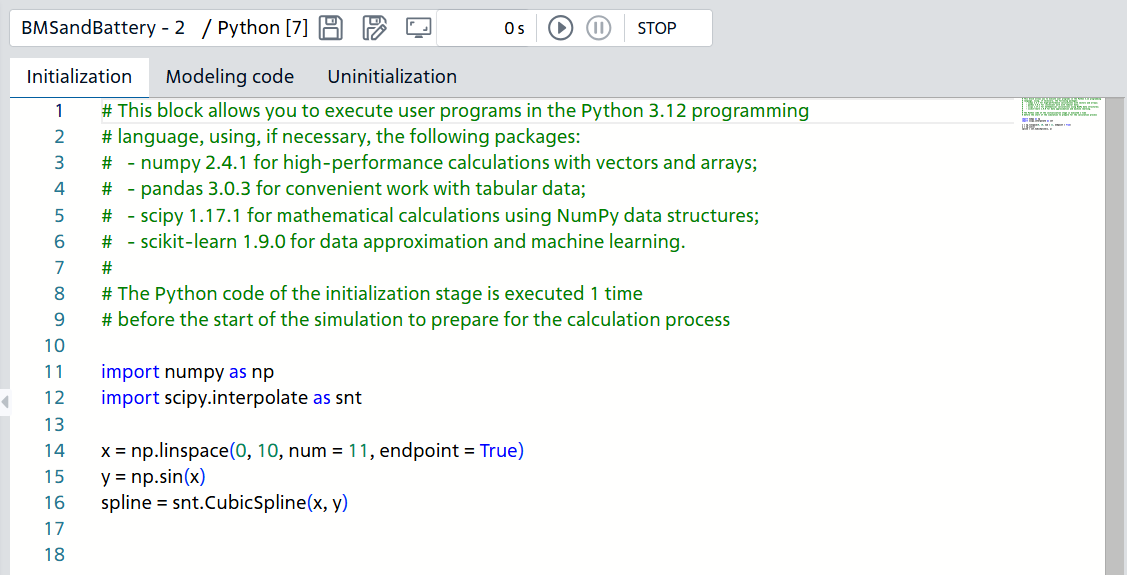
Example of initialization in the Python block code editor#
The example above imports the Python packages NumPy and SciPy to perform calculations and data analysis. It also creates the x, y and spline objects once for later use in the calculation code.
1.2. Calculation#
The code for this stage is executed at each integration step from the start to the stop of the calculation. This calculation stage is executed multiple times after initialization. Below is an example for processing signals from two input ports and transmitting the calculation results to the output port at each integration step.
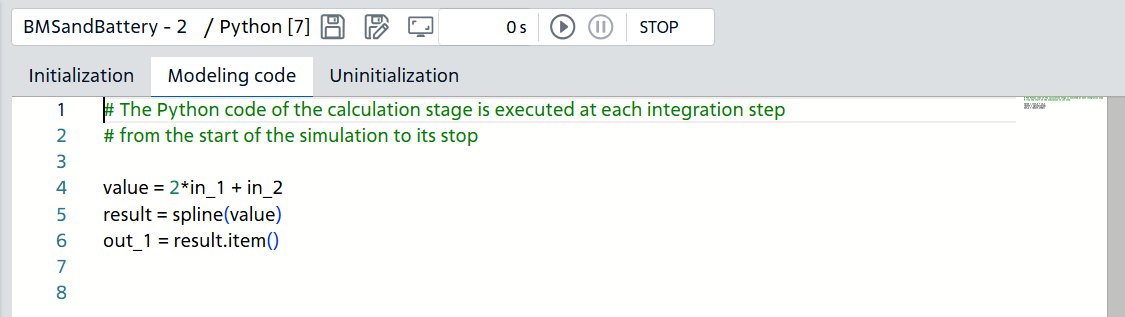
Example of modeling code#
In the example above, piecewise smooth interpolation is performed, in which:
The input value is the
valueobject - the intermediate result of calculating the values of the input portsin_1andin_2;The interpolation result is passed to the output port
out_1.
1.3. Uninitialization#
The code at this stage is executed when the calculation stops and is intended primarily to free up previously used resources of the Python program: data in memory, closing files and network connections.
Also at this stage, final calculations can be performed that require the availability of all obtained modeling results, for example, transformation, aggregation, summation of time series and other calculated values.
Hint
It is recommended to use special blocks of the Automation library for final calculations. For example, the Integrating block (Time domain integration) block to sum up the values for the entire simulation time.
2. Python block operating modes#
Python block during simulation can operate in the following modes:
In normal mode, the block takes values from one or more input ports, performs calculations on them, and sends the results to one or more output ports.
In generator mode, in which the block performs calculations and sends the results to one or more output ports.
For all modes, a block must have one or more output ports. For normal mode, one or more input ports must be created.
3. Python block ports type#
The ports of the Python block are of type Automation and can only exchange double-precision floating-point values (double in Java) with ports of other blocks.
3.1. Requirements for user program objects#
Arguments to functions, classes, and class methods of a user’s Python program that are intended to receive values from other blocks of the REPEAT VISION model through the input ports of the Python block (in_1, in_2, etc.) must be real scalars of type float in Python.
Below is an example of a Python block with one input port and one output port.
def line(x : float) -> float:
  return 2 * x + 5
out_1 = line(in_1)
The initialization step creates a function line with one argument x annotated with type float. The function, when receiving a real value, also returns a real calculation result. At the calculation stage, the function takes the value of the input port in_1 and returns the real value of the calculation result to the output port out_1.
Objects, functions, and methods of user program classes that are intended to pass calculation results to the output ports of the Python block (out_1, out_2, etc.) can return the following as a result of their work:
Real scalars of type float;
Integer scalars of type
int.
The REPEAT VISION calculation module automatically converts output port values to double-precision real values (double in Java) during the simulation process.
4. Using global variables in a Python block#
In the user program Python block, the global variables of the REPEAT VISION model are available for use.
In the Python block program, the model’s global variables are available as attributes of the GLOBAL_VARIABLES object.
The GLOBAL_VARIABLES object is an instance of the namedtuple class of the standard collections module.
GLOBAL_VARIABLES attributes:
Have names corresponding to the global variables of the model;
Have the
floattype.
For example, if the REPEAT VISION model has global variables created as shown in the table below.
Variable name |
Variable value |
Object in a Python block |
|---|---|---|
PIPE_DIAM_IN |
0.2 |
|
LENGTH |
1e-4 |
|
Then in the Python block program, the values of global variables can be accessed or used directly as follows.
import math as m

area = 0.25 * m.pi * GLOBAL_VARIABLES.PIPE_DIAM_IN**2
out_1 = GLOBAL_VARIABLES.LENGTH * area
5. Python version and available modules#
Блок Python позволяет выполнять пользовательские программы на языке программирования Python 3.12, используя, при необходимости, модули, приведённые в таблице ниже.
Module |
Version |
Purpose |
|---|---|---|
2.4.1 |
Ensuring high-performance work with vectors and data arrays |
|
3.0.3 |
Ensuring convenient work with tabular data |
|
1.17.1 |
Performing Mathematical Calculations Using NumPy Data Structures |
|
1.19.0 |
Performing data approximation and applying machine learning models |
6. Error output#
A description of possible errors in the user program’s operation in the Python block can be found in the journal.
7. Properties#
No
8. Inputs and outputs#
Parameters |
Input/Output |
Description |
Units of measurement |
Port type |
|---|---|---|---|---|
in_1 |
Input |
– |
– |
Automation |
in_2 |
Input |
– |
– |
Automation |
out_1 |
Output |
– |
– |
Automation |
In order to see the connection capabilities of the block, you need to go to page Description of block ports