

Using Python in CPython classic implementation#
repeat package has been developed to automate the work with REPEAT VISION model from Python.
Attention
The user must have programming skills to solve automation tasks using Python in classic CPython implementation.
You will also need:
In this tutorial you will learn the possibilities of work automation with REPEAT VISION model on the example of [DEMO] lifting mechanism TPAM (three-phase asynchronous motor) project.
You will have the following skills after completing the tutorial:
The skill to adjust access to REPEAT VISION model from Python program via API keys
Knowledge in setting up time intervals to obtain the required calculation results
Skills in interacting with the model through the context manager to obtain the necessary calculation results
1. First use#
In your hard disk workspace you need to create a folder to work with REPEAT VISION model, for example, a folder with repeat_postprocessing name. In repeat_postprocessing working folder, a virtual environment is created for further installation of repeat package with its dependencies.
mkdir repeat_postprocessing
cd repeat_postprocessing
python -m venv .
After the working folder and virtual environment have been created, the virtual environment is activated. bashcommand is executed for Linux-based operating systems, and for Windows PowerShell command is executed.
source ./bin/activate
Scripts\Activate.ps1
Now it is necessary to install repeat package. This command will also install necessary dependencies.
python -m pip install repeat
It is necessary to create a file, such as example.py, in your convenient Python program code text editor in repeat_postprocessing working folder. Inexample.py file, create code to import repeat package and call its help information.
# -*- coding: utf-8 -*-
import repeat as rp

help(rp)
Then, execute this file on the command line.
python example.py
The following result will be obtained on the command line as a result of executing the example.
Help on package repeat:

NAME
    repeat

DESCRIPTION
    repeat
    ------

    Модуль repeat предназначен для взаимодействия пользовательской Python программы
    с расчётной моделью REPEAT VISION для решения следующих задач:
       - выполнение исследований на результах расчётов модели REPEAT VISION
       - анализ данных и выполнение постобработки временных рядов REPEAT VISION.
Now it is possible to implement the process of interacting with REPEAT VISION model.
2. User API key setting#
The connection to REPEAT VISION requires using API key, which you can generate in the corresponding settings section of your account.
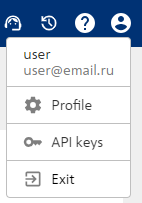
In REPEAT VISION interface, click on the user settings button and select the section in the drop-down window API keys.
In API keys section create API key using the button New API key.
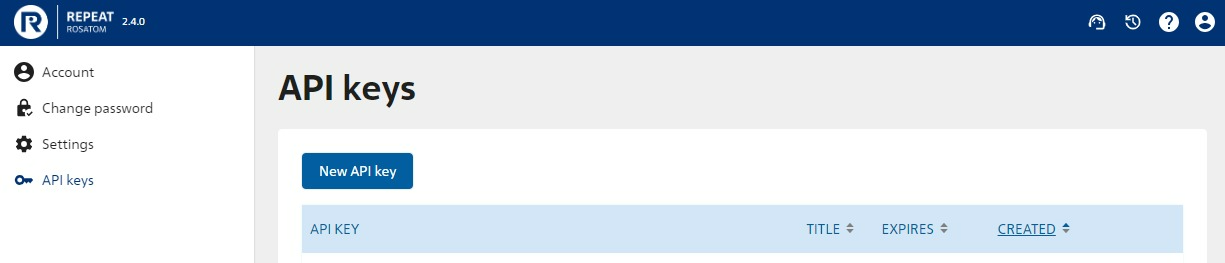
Add new API key to the user settings of User class when creating his copy in your program in example.pyfile.
# -*- coding: utf-8 -*-
import repeat as rp

user = rp.User(token = 'enter a unique API key from REPEAT user cabinet instead of this comment')
Then, it is necessary to set up Application class to adjust connection to REPEAT VISION.
app = rp.Application(user)
Now everything is ready to interact with REPEAT VISION model!
3. Start REPEAT VISION model for calculation#
In REPEAT VISION interface it is necessary to open [DEMO] lifting mechanism TPAM project and perform the following steps:
Start the calculation using PLAY button
 up to the required time value, e.g. up to 2 seconds
The calculation is paused using PAUSE button

4. Time interval setting#
The following step creates a copy of TimeInterval to set the time interval where the user needs to get values of parameter calculation results from REPEAT VISION model:
The
startargument is sent the initial range value in milliseconds \(start = 1 [ms]\),The
endargument is sent the end range value \(end = 2000 [ms]\). Note that the calculation is paused at time value of 2 seconds.
t_interval = rp.TimeInterval(start = 1, end = 2000)
5. Setting up interaction with the model#
Using get_model method ofApplication class a copy of Model class is created to further obtain calculation results from REPEAT VISION model.
This action requiresget_model method to send t_interval with time range settings as an argument.
model = app.get_model(t_interval)
6. Obtaining results of model calculations#
It is possible now to get calculation results for required parameters from REPEAT VISION model using the context manager of Modelclass copy, where get_results method is sent line value for the interested parameter name.
The get_results method returns calculation results in pandas.Series data structure of popular pandas data analysis module.
Inside with the required set of parameter results can be obtained.
Hint
The values of model parameter name lines are available to copy in REPEAT VISION graphical interface in block setting areas
Get results for two parameters with names'1687723033287_OUT_2' and '1687722637724_OUT_3'
with model as md:
  res1 = md.get_results('1687723033287_OUT_2')
  res2 = md.get_results('1687722637724_OUT_3')
7. Work with calculation results#
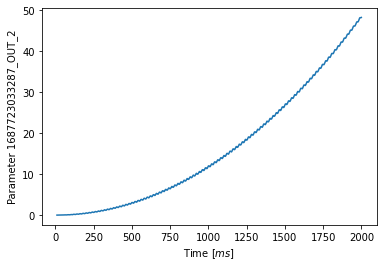
The first step in analyzing data is to review numerical values of parameters as well as their interactions, e.g., in diagrams. For this purpose, use integrated pandas methods to analyze results of '1687723033287_OUT_2'parameter, located in res1object.
res1.head() # Numerical values output of the parameter calculation results
res1.plot(  # Displaying dependencies on a diagram
   ylabel = f'Parameter {res1.name}', # Adding a signature with the parameter name to Y axis
   xlabel = 'Time $[ms]$' # Adding a signature with the time name to X-axis
   )
These methods calls will display the following:
1.0    0.000000e+00
2.0    5.058322e-08
3.0    6.064362e-07
4.0    3.427226e-06
5.0    1.293609e-05
Name: 1687723033287_OUT_2, dtype: float64
8. Results#
All program code
# -*- coding: utf-8 -*-
import repeat as rp

user = rp.User(
   token = 'enter a unique API key from REPEAT user cabinet instead of this comment'
   )
app = rp.Application(user)
t_interval = rp.TimeInterval(
   start = 1, # initial value of time range in [ms]
   end = 2000 # end value of time range in [ms]
   )
model = app.get_model(t_interval)
with model as md:
  res1 = md.get_results('1687723033287_OUT_2')
  res2 = md.get_results('1687722637724_OUT_3')

res1.head() # Numerical values output of the parameter calculation results
res1.plot(  # Displaying dependencies on a diagram
   ylabel = f'Parameter {res1.name}', # Adding a signature with the parameter name to Y axis
   xlabel = 'Time $[ms]$' # Adding a signature with the time name to X-axis
   )
In this tutorial you have been learnt the following skills:
Ability to set up access to REPEAT VISION model using
UserandApplicationclassesKnowledge in setting up time intervals using
TimeIntervalclass taking into account its feature to set the time in microsecondsFeatures of obtaining parameter names from REPEAT VISION interface
Skills in interaction with model using copy context manager of
Modelclass to get necessary calculation results usingget_resultsmethod